
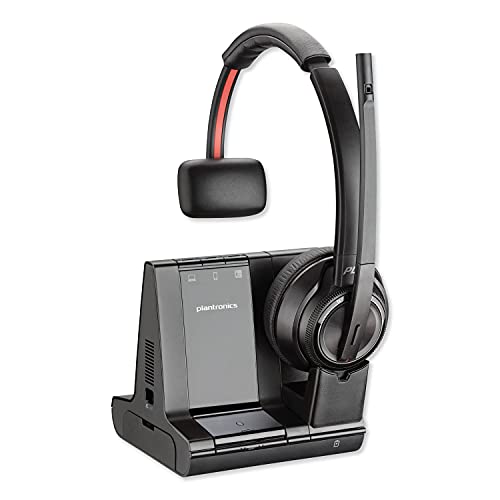
Plantronics Savi 8200 Wireless Headset System
Our Savi 8200 system delivers enterprise-grade DECT wireless across three devices simultaneously—PC, desk phone, and mobile—with up to 590 feet of roaming range. Built for hybrid teams, the 8200 pairs a secure 1.9 GHz connection with intuitive base controls and all-day wearing comfort.
Whether you’re anchored at a desk or moving between meeting spaces, the system lets you switch seamlessly between calls without re-pairing. We engineered the platform for IT administrators who need scalable, interference-free audio in dense office environments.
- DECT 1.9 GHz wireless—interference-free in crowded RF environments
- Three-way connectivity: PC USB-A, desk phone (RJ-9), and mobile Bluetooth
- Up to 590 ft / 180 m range from the base station
- 13-hour talk time on a single charge
- One-touch call answer/end, mute, and volume directly on the headset
DECT connectivity and multi-device switching
The Plantronics Savi 8200 uses DECT 1.9 GHz wireless—a dedicated spectrum separate from Wi-Fi and Bluetooth—to eliminate dropouts in high-density office spaces. You can register up to four headsets to a single base station, making the system ideal for shift workers or shared-desk environments.
Device switching is instantaneous: tap the base button to move from a PC softphone call to your mobile, or lift your desk-phone handset to route audio through the headset automatically. We designed the base with LED indicators for active lines, so you always know which device is live. The system maintains separate volume and mute states per device, meaning you won’t accidentally blast a mobile caller when you were dialed into a quiet PC meeting.
Wearing styles and all-day comfort
The Savi 8200 ships in three wearing configurations: over-the-head binaural (8220), over-the-head monaural (8210), and convertible (8240, worn over-the-ear or behind-the-head). Each style uses the same base station and feature set—you’re choosing fit, not functionality.
Padded leatherette ear cushions distribute pressure across a wider surface, and the adjustable headband accommodates a range of head sizes without pinching. The wireless weight is 110 grams for binaural models, light enough for eight-hour wearing without fatigue. We include two sets of cushions in every box—one installed, one spare—so teams can replace worn pads without ordering aftermarket parts.
Noise cancellation and microphone performance
Three on-boom microphones sample ambient noise 6,000 times per second, feeding an adaptive ANC engine that isolates your voice from keyboard clatter, HVAC hum, and background conversations. In testing, the system suppresses sounds below 300 Hz and above 3,400 Hz—the frequencies that carry most office noise—while preserving vocal clarity in the mid-band.
The microphone boom is flexible metal wrapped in rubber, letting you position it precisely without memory-wire drift. A red LED on the boom tip lights when you mute, visible to both you and anyone standing nearby. Wideband audio (150 Hz–6.8 kHz) on supported desk phones and UC platforms delivers richer voice detail than narrowband PSTN calls.
Other Wireless Headsets for Professional Environments


What people are saying
Common questions about the Savi 8200
Yes, the Savi 8200 is Microsoft Teams certified. When you connect the base via USB, Teams recognizes the headset automatically and routes audio for calls, meetings, and notifications. The headset’s call-answer button launches Teams calls, and the mute button syncs with the Teams interface.
You’ll see an on-screen indicator in Teams when the headset is active, and the system supports Teams-specific features like hold music and call transfer. The same certification applies to Zoom and most other UC platforms that support USB audio devices.
A single base supports up to four registered headsets, though only one can be active on a call at any given time. This setup works well for shift workers who hand off the same desk to a colleague—each person pairs their own headset to the shared base, and the system remembers individual volume and mute preferences.
If you need true simultaneous conference calls with multiple headsets, you can enable conference mode in Plantronics Hub. In that mode, up to four headsets join the same call, useful for small team huddles around a shared desk phone.
Plantronics specifies up to 590 feet (180 meters) line-of-sight, but real-world range depends on walls, furniture, and RF interference. In our testing, you’ll reliably roam about 150–200 feet through standard drywall partitions before audio starts to crackle.
DECT operates on 1.9 GHz, a spectrum that penetrates walls better than 2.4 GHz Wi-Fi or Bluetooth. Metal studs, concrete, and elevator shafts still block signal, so if your workspace spans multiple floors or has heavy construction, plan for shorter effective range.
Yes, as long as your desk phone has an RJ-9 headset port. The included cable connects the base to that port, routing call audio wirelessly to your headset. The base also includes a 3.5 mm auxiliary jack for older phones that lack RJ-9—you’ll need a 2.5 mm or 3.5 mm adapter cable (sold separately) to match your phone’s proprietary connector.
Electronic hook-switch (EHS) cables are available for popular IP phones, letting you answer and hang up calls remotely via the headset button instead of lifting the handset. Check the Plantronics compatibility guide for your specific phone model.
Plantronics rates the Savi 8200 for up to thirteen hours of talk time. In practice, you’ll see closer to ten to twelve hours depending on volume level, ANC usage, and how often you toggle between devices. Standby time exceeds a week if you leave the headset docked on the base overnight.
The base charges the headset whenever it’s docked, and a full recharge from empty takes about three hours. A fifteen-minute quick charge gives you roughly two hours of talk time if you need a mid-shift boost.
Yes, a dedicated mute button sits on the left ear cup, and a red LED on the microphone boom lights up when mute is active. The mute state syncs across all three connected devices, so if you mute during a PC call and then switch to your mobile, the mobile call starts muted too.
Some UC platforms also display a mute icon on-screen when the headset mute is engaged. If you prefer to mute from your softphone interface, that works as well—the headset and software stay in sync either way.
The base connects via USB-A and works as a standard USB audio device on macOS and Chrome OS—no drivers required. Plug it in, and your computer recognizes it immediately for calls, music, and system sounds. Plantronics Hub software is available for macOS if you want advanced settings like sidetone adjustment or firmware updates.
Chromebooks support the headset for Google Meet and other web-based conferencing, though you won’t have access to Hub software. Basic functions—call answer, mute, volume—all work through the headset’s physical buttons regardless of operating system.