
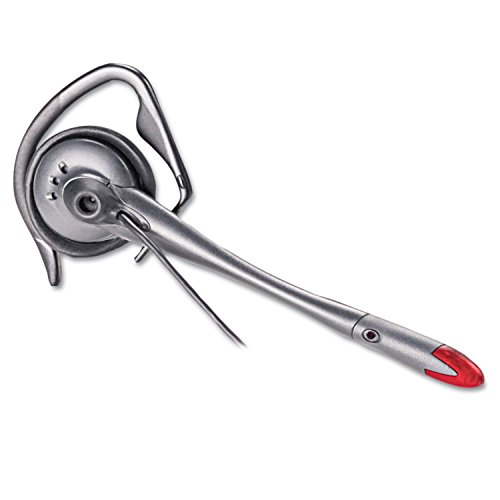


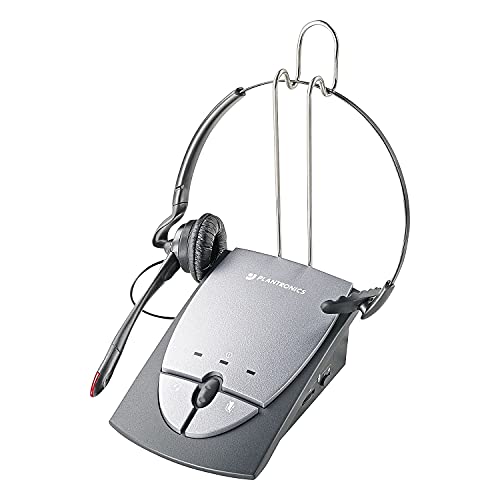
Plantronics S12 Telephone Headset System
The Plantronics S12 brings professional headset performance to any office telephone. This corded system pairs a lightweight over-the-head headset with an amplifier that connects directly to your desk phone’s handset port — no batteries, no Bluetooth pairing, just plug-and-talk reliability.
We built the S12 for all-day wear. The over-the-head design distributes weight evenly, while the foam ear cushion and adjustable headband let you dial in the fit. The noise-canceling microphone filters out background conversation and keyboard noise, so your voice comes through clearly on every call.
Universal compatibility means the S12 works with virtually any desk phone that has a standard handset jack. Volume and mute controls sit on the amplifier base within easy reach. Whether you’re managing high call volume or need hands-free flexibility for note-taking, the S12 handles the workload without the complexity of wireless systems.
- Corded headset system with desk phone amplifier
- Over-the-head wearing style with adjustable headband
- Noise-canceling microphone with flexible boom
- Universal compatibility with standard desk phone handset ports
- In-line volume and mute controls on amplifier base
Universal desk phone compatibility
The S12 amplifier connects to any desk phone with a standard RJ-9 handset port. Unplug your handset from the phone base, plug it into the amplifier’s handset jack, then connect the amplifier to the phone — the entire setup takes under a minute. This universal design works across phone brands and models without requiring adapters or configuration.
Once connected, the amplifier becomes your call control hub. Volume adjustment lets you boost or lower audio without touching the phone itself. The mute button gives you instant privacy during calls. Because the connection is purely analog, there’s no lag, no charging routine, and no wireless interference to troubleshoot.
Lightweight over-the-head design
We designed the S12 headset to disappear during long call sessions. The over-the-head band distributes weight across the top of your head rather than relying on ear hooks or in-ear pressure points. The adjustable slider accommodates different head sizes, and the single foam ear cushion rests gently against one ear.
This monaural design — one earpiece instead of two — keeps you aware of your surroundings while you’re on calls. You can hear a colleague approaching your desk or catch a supervisor’s question without removing the headset. The quick-disconnect feature lets you step away from your workstation for a moment without taking the headset off or ending the call.
Noise-canceling microphone performance
The S12’s flexible boom microphone positions directly in front of your mouth and actively reduces ambient noise. In shared office environments where multiple conversations happen simultaneously, the noise-canceling circuit filters out voices from neighboring desks and keyboard clicks from your own workspace.
The microphone boom adjusts up or down and rotates to either side, so you can wear the headset on your left or right ear. Once positioned, it stays in place throughout the day. Voice clarity remains consistent whether you’re speaking at normal volume or lowering your voice during sensitive calls.
Headset systems for every desk phone setup



What people are saying
Common questions about the S12 headset system
The S12 is compatible with any desk phone that has a standard RJ-9 handset port — the square jack where your handset cord currently plugs in. This includes most major brands like Cisco, Avaya, Polycom, Mitel, and Nortel. If your phone has a modular handset connection, the S12 will work without adapters.
The system does not require external power or phone-system programming. Simply disconnect your handset from the phone base, connect it to the amplifier, then connect the amplifier to the phone.
The S12 is designed exclusively for analog desk phones and does not connect to computers via USB or audio jacks. For PC-based calling, Skype, Zoom, or other softphone applications, you’ll need a headset with a USB connection or a separate USB adapter.
If you use both a desk phone and a computer for calls, consider a model with dual connectivity or a switch box that lets you toggle between devices.
Volume controls are located on the amplifier base. Two buttons labeled with plus and minus symbols let you increase or decrease listening volume in small increments. These controls adjust the audio level you hear in the headset without changing the phone’s volume settings.
You can make volume adjustments mid-call, and the amplifier remembers your preferred level for future calls. The volume range accommodates both soft-spoken and loud callers.
Yes, the S12 features a noise-canceling microphone that filters out background sounds while preserving your voice. The microphone uses acoustic design and positioning to focus on your speech and reduce ambient office noise, keyboard clicks, and nearby conversations.
For best performance, position the microphone boom about one finger-width from the corner of your mouth. The flexible boom lets you fine-tune placement, and the noise canceling circuit adapts automatically to your environment.
The S12 headset is convertible — the microphone boom rotates and the headband adjusts so you can wear it on your left or right ear based on preference. The over-the-head band provides stable support regardless of which side you choose.
To switch sides, rotate the microphone boom 180 degrees and reposition the ear cushion. Most users pick a side based on desk layout and stick with it, but you can change configuration anytime.
No, the S12 is a corded system that draws power directly from your telephone line. There are no batteries to replace or charge cycles to manage. As long as your desk phone has power, the headset system remains operational.
This makes the S12 particularly reliable during extended power outages in facilities with backup phone systems, since the headset doesn’t depend on external AC power or battery reserves.
The quick-disconnect interface is a small connector between the headset cable and the amplifier cord. Press the release tab and the headset separates from the amplifier cable, letting you walk away from your desk briefly while keeping the headset on your head.
This is useful when you need to step to a filing cabinet, check a printout, or speak to a colleague face-to-face without ending your call or removing the headset. Reconnecting is a simple snap-in motion.