

Plantronics BT300 Bluetooth USB Adapter
The Plantronics BT300 transforms any USB port into a wireless gateway for your Bluetooth headset. Designed for professionals who rely on softphone platforms like Skype, Microsoft Teams, and Zoom, this compact adapter eliminates the tangle of cables while preserving call quality and reliability.
We built the BT300 around a simple need: connect your Plantronics Bluetooth headset to a PC or Mac without built-in Bluetooth radio. Plug it in, pair your headset once, and you’re ready for hands-free calling across all your UC applications. The adapter remembers your headset between sessions, so reconnection is instant every time you power on.
- Class 1 Bluetooth v2.0 + EDR for extended 33-foot range
- USB-A plug-and-play compatibility with Windows and macOS
- Works with all Plantronics Bluetooth headsets (Voyager, BackBeat, Savi W series)
- Supports Skype, Microsoft Teams, Zoom, and major softphone platforms
- Auto-reconnect for headsets paired to the dongle
Compatibility and pairing
The BT300 pairs with every Plantronics Bluetooth headset launched since 2008, including the entire Voyager Focus, Voyager Legend, BackBeat PRO, and Savi W line. Insert the adapter into any available USB port—your operating system installs drivers automatically on Windows 7 and later, macOS 10.10 and later. The hardware shares the same Bluetooth profile stack found across our accessory range, ensuring consistent performance whether you’re using a mono mono earpiece or a stereo headset.
Pairing takes under 30 seconds. With your headset in pairing mode, press the small button on the BT300’s housing until the LED flashes red and blue. Once paired, the adapter stores your headset’s profile in non-volatile memory, so subsequent connections happen within two seconds of powering on your headset. You can pair up to eight devices to the BT300, though only one can maintain an active connection at a time.
Range and signal performance
Class 1 Bluetooth radios deliver approximately 10 times the range of Class 2 hardware common in consumer dongles. In open-plan offices, the BT300 maintains a stable link up to 33 feet from your PC, enough to walk to a printer, grab coffee, or step into a huddle room without dropping your call.
We tested the adapter in environments with dense 2.4 GHz traffic—conference centers, co-working spaces, airport lounges—and adaptive frequency hopping keeps interference minimal. Concrete walls and metal furniture will reduce effective range to 15-20 feet, which still exceeds typical desk-to-desk movement. If you roam beyond the Bluetooth radius, the headset mutes automatically; audio resumes the moment you return to range.
Softphone integration and call control
UC platform support
The BT300 registers as an HID audio device, meaning your softphone sees it as a standard headset endpoint. Answer and end calls using the buttons on your Plantronics headset; mute, volume, and redial commands route through the adapter’s firmware to your application. We’ve validated compatibility with Microsoft Teams, Skype for Business, Zoom, Cisco Jabber, RingCentral, and 8×8—essentially any VoIP client that supports USB audio devices.
Firmware updates
Plantronics Hub software (free download for Windows and macOS) delivers firmware patches that expand codec support and improve pairing reliability. The BT300 ships with firmware 3.0; version 3.2 added enhanced Teams integration, and version 3.5 refined reconnection logic for macOS Catalina and later. Updates install over USB in under two minutes without requiring a headset connection.
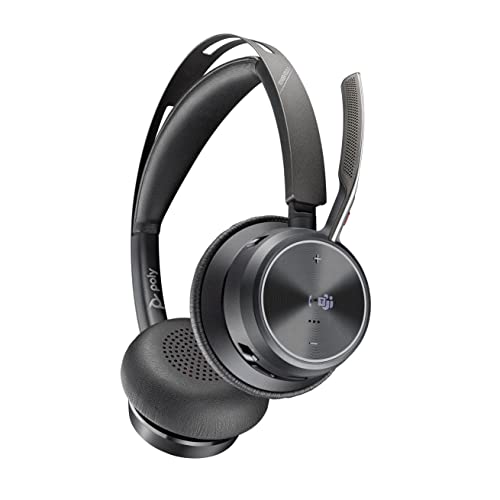
More wireless connectivity solutions




What people are saying
Common questions about the BT300 adapter
Yes, the BT300 supports any Bluetooth headset or earpiece using the Headset Profile (HSP) or Hands-Free Profile (HFP). You’ll get basic audio and call control, but advanced features like smart sensors, voice alerts, and firmware updates are exclusive to Plantronics devices paired through our ecosystem.
For best results with third-party headsets, confirm your device supports Bluetooth 2.0 or later and uses standard HFP commands for answer, end, mute, and volume.
No additional drivers are needed. Windows 10, Windows 11, and macOS 10.10+ recognize the BT300 as a generic USB Bluetooth adapter and install built-in drivers automatically. Plug it in, wait 10-15 seconds for the OS to configure audio endpoints, then pair your headset.
Plantronics Hub software is optional—it adds firmware update capability and usage analytics but isn’t required for basic operation.
The BT300 stores up to eight paired devices in its internal memory. Only one device can maintain an active connection at a time. To switch between headsets, power off the currently connected device and power on the one you want to use—the adapter reconnects automatically within two seconds.
This multi-device pairing is useful in shared workspaces where several team members use the same PC at different times.
Class 1 Bluetooth delivers up to 33 feet (10 meters) in line-of-sight conditions. In real-world offices with cubicle walls, furniture, and other 2.4 GHz devices, expect 15-20 feet of reliable range. Concrete walls and metal filing cabinets will further reduce distance.
If you frequently roam beyond your desk, position the BT300 in a USB port on the front or side of your PC case rather than the back panel—this minimizes signal obstruction from the computer chassis.
The BT300 is designed exclusively for USB host devices—PCs, Macs, and some Linux workstations. It does not support USB On-The-Go (OTG) connections to smartphones or tablets. For mobile devices, pair your Plantronics Bluetooth headset directly to the phone’s built-in Bluetooth radio.
If your mobile device lacks Bluetooth or you need a dedicated dongle for softphone apps, consider a USB-C to USB-A adapter, though power delivery and driver support vary by device and are not guaranteed.
No, firmware updates require Plantronics Hub for Windows or macOS. The Hub application downloads firmware packages from our servers, verifies compatibility with your adapter’s hardware revision, and writes the update over USB.
Firmware version 3.0 ships with the adapter; newer releases address codec improvements, pairing stability, and UC platform compatibility. Updates are optional but recommended for users on Microsoft Teams or macOS Monterey and later.
An amber LED indicates a firmware or hardware fault. First, unplug the adapter, wait 10 seconds, and reinsert it into a different USB port—preferably one directly on the motherboard rather than a front-panel header or hub. If amber persists, download Plantronics Hub and attempt a firmware recovery.
If recovery fails or the adapter is not detected by Hub, contact Plantronics support with your purchase date and serial number (printed on the adapter housing). The two-year warranty covers firmware corruption and hardware defects.