

Plantronics Calisto Speakerphone – Premium USB Conference Audio
Our Calisto speakerphone brings professional-grade conferencing to any workspace. Designed for crystal-clear communication in both personal offices and shared meeting rooms, this USB-connected device captures every voice in the room with precision.
The omnidirectional microphone array picks up sound from all angles, ensuring remote participants hear every word spoken around the table. Dynamic bass tuning and advanced echo cancellation deliver rich, natural audio while eliminating the hollow sound typical of laptop speakers. Whether you’re joining a quick one-on-one or hosting a full team discussion, the Calisto adapts to your call volume and speaking patterns in real time.
We built the Calisto for professionals who move between spaces throughout the day. The compact footprint fits into laptop bags without adding bulk, while the durable construction withstands daily transport. Plug-and-play USB connectivity works instantly with Zoom, Microsoft Teams, Google Meet, and every major platform – no drivers or software installation required.
- 360-degree omnidirectional microphone with voice-optimized pickup pattern
- USB-A connectivity with universal platform compatibility
- Dynamic audio tuning adjusts to room size and speaker count
- Advanced echo cancellation and background noise suppression
- Integrated call controls for mute, volume, and answer/end functions
Audio performance for distributed teams
The Plantronics Calisto transforms how distributed teams collaborate. Our 360-degree microphone configuration captures voices from every seat around the table, eliminating the frustration of repositioning devices or asking participants to lean closer. The system intelligently filters background keyboard noise and air conditioning hum while preserving vocal clarity.
Dynamic frequency response adapts to your speaking volume and distance from the device. When you’re presenting from across the room, the Calisto automatically boosts gain to maintain consistent audio levels. Move closer for a private sidebar, and the system scales back to prevent distortion. This real-time adjustment means remote colleagues experience smooth, professional sound regardless of in-room movement.
Plug-and-play connectivity across platforms
Standard USB-A connection ensures the Calisto works the moment you plug it in. Operating systems recognize the device as a native audio endpoint without requiring proprietary drivers or configuration utilities. This universal compatibility extends to every web conferencing platform – the speakerphone appears as a selectable audio device in Zoom, Teams, WebEx, GoToMeeting, and Slack calls.
The device draws power directly from the USB connection, eliminating the need for separate charging cables or wall adapters. A single cable handles both audio transmission and power delivery, reducing desktop clutter and simplifying setup when you’re working from client sites or hotel rooms.
Portable design for hybrid workstyles
We designed the Calisto for professionals who split time between home offices, corporate meeting rooms, and client locations. The compact circular footprint measures just under five inches in diameter and weighs less than half a pound, fitting easily into laptop bags alongside notebooks and chargers.
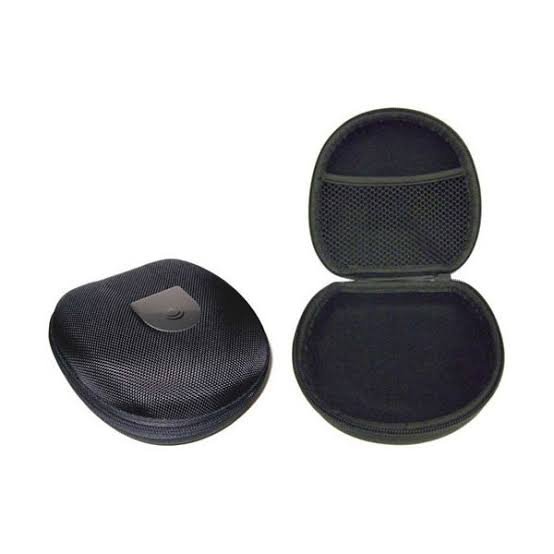
The included protective case guards the speaker grille and prevents the USB cable from tangling during transport. Hard-shell construction absorbs impacts from being tossed into backpacks or stacked under airplane seats. Despite the rugged exterior, the case adds minimal bulk – the complete package remains slim enough to slide into interior laptop sleeves.
Complete your workspace audio setup




What people are saying
Common questions about the Calisto speakerphone
No charging or batteries needed. The Calisto draws all its power directly from the USB connection to your computer. As long as your laptop or desktop is powered on, the speakerphone operates continuously without requiring separate charging cables or wall adapters.
This bus-powered design means you’ll never experience mid-call battery failures or need to remember to charge the device overnight. The simplicity proves especially valuable for professionals who travel frequently or work from multiple locations throughout the week.
The Calisto comfortably handles four participants seated around a standard conference table, with optimal performance when the device sits centrally among speakers. The 360-degree microphone captures voices clearly within approximately six feet of the unit.
For larger groups, positioning the speakerphone closer to primary speakers ensures their contributions receive clear pickup. Teams of five or six can use the device successfully if seated relatively close together, though we recommend testing your specific room configuration to confirm coverage meets your needs.
Yes, the Calisto functions as a standard USB audio device recognized by all major platforms including Zoom, Microsoft Teams, Google Meet, WebEx, Slack, GoToMeeting, and Skype. When you plug in the speakerphone, it appears in your application’s audio settings as a selectable microphone and speaker option.
No proprietary software installation is required. Simply choose the Calisto as your preferred audio device within your conferencing platform’s settings menu, and the system handles audio routing automatically from that point forward.
The speakerphone includes a standard USB-A connector. For USB-C-only laptops like newer MacBooks and many Windows ultrabooks, you’ll need a USB-C to USB-A adapter or hub. Most multiport USB-C hubs provide USB-A ports specifically for peripherals like this.
Once connected through an adapter, the Calisto functions identically to direct USB-A connections. Power delivery and audio quality remain unchanged when using quality adapters or hubs from reputable manufacturers.
A dedicated physical mute button on the device top surface toggles microphone status with a single press. An LED indicator illuminates red when muted, providing clear visual confirmation that your microphone is disabled.
The hardware mute function works independently of your conferencing software’s mute controls. This means you can mute at the device level even if the application interface is minimized or you’re screen-sharing. The tactile button provides reliable feedback, eliminating the uncertainty that sometimes comes with software-only mute toggles.
Your Calisto package includes the speakerphone unit, a connected USB-A cable for computer connectivity, and a protective travel case designed to fit the device and cable securely. The case features hard-shell construction to protect against impacts during transport.
We also include a quick-start guide covering basic setup and controls, though most users find the plug-and-play design intuitive enough to use immediately without consulting documentation. The device comes with a standard manufacturer warranty covering defects in materials and workmanship.
The Calisto is designed primarily for computer use via USB connection. Some Android devices with USB-OTG support may recognize the speakerphone when connected through an appropriate adapter, though functionality varies by device manufacturer and Android version.
For iOS devices like iPhones and iPads, compatibility is limited because Apple restricts USB audio device support. We recommend using the Calisto with Windows, macOS, or ChromeOS computers where universal compatibility is guaranteed without configuration hassles.