

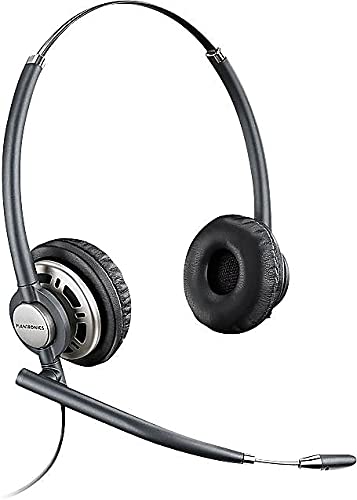
Plantronics HW720 Headset – Professional Wired UC Headset
The Plantronics HW720 is our binaural wired headset engineered for professionals who spend the day on calls. With dual-ear cushions that block ambient noise and wideband audio that captures every word clearly, this headset delivers the comfort and call quality your team needs. We built the HW720 with a durable metal headband that flexes without breaking, leatherette ear cushions that sit comfortably for hours, and a noise-canceling microphone that filters background chatter.
Whether you’re in a busy call center or a shared office, the HW720 keeps your conversations crisp. Our quick-disconnect feature lets you walk away from your desk without removing the headset, and the ultra-lightweight design ensures you’ll forget you’re wearing it by mid-morning.
- Binaural design with dual leatherette ear cushions for passive noise reduction
- Wideband audio frequency response for crystal-clear voice clarity
- Noise-canceling microphone with flexible boom positioning
- Metal headband construction for long-term durability
- Quick-disconnect cable (QD) for mobility without removing headset
Audio clarity and wideband technology
We designed the Plantronics HW720 around wideband audio—a frequency range from 150 Hz to 6800 Hz that captures the natural nuances of human speech. Standard narrowband headsets cut off those frequencies, leaving voices sounding tinny and vowels blurred. With wideband, every syllable lands clearly, which matters when you’re deciphering account numbers or spelling names over a noisy line.
The binaural design seals both ears, so ambient noise from keyboards, printers, and neighboring conversations fades into the background. Our noise-canceling microphone uses acoustic mesh to filter wind and breath sounds, ensuring the person on the other end hears your voice, not the office around you. That same mic boom rotates 360 degrees and locks into place, so you can position it exactly where your voice projects best.
Comfort engineering for all-day wear
We know call-center agents and customer-service reps wear headsets from morning standup to end-of-shift wrap-up, so the HW720’s weight became a priority. At 52 grams total, it’s lighter than most smartphones, and the metal headband distributes that weight evenly across your head instead of pressing down on one spot.
The leatherette ear cushions are slightly oversized to surround your ears without squeezing them. We chose leatherette over foam because it wipes clean and doesn’t absorb oils or sweat over months of use. The cushions attach with a twist-lock mechanism, so when they eventually wear out—typically after two years of daily use—you can replace them in seconds without tools.
Quick-disconnect cable and mobility
Walking away without removing your headset
Our quick-disconnect (QD) cable is a short coiled cord between the headset and the desk-phone amplifier or USB adapter. When you need to step away—grab a file, refill coffee, or walk to a printer—you click the QD apart and leave the headset on your head. The headset stays connected to your ears; only the cable detaches from the base unit.
When you return, the cable clicks back together in one motion. No fumbling with tangled cords or resetting your mic boom every time you stand up. The QD interface is the same across our entire EncorePro and HW series, so if you upgrade amplifiers or switch desks, your HW720 connects to the new setup without adapters.
More professional wired headsets from Plantronics


What people are saying
Common questions about the HW720
The HW720 requires a Plantronics amplifier or USB adapter to connect to a computer. We recommend pairing it with our DA90 or DA80 USB adapter, which converts the quick-disconnect plug into a USB connection and provides call-answer buttons, volume control, and mute. Once connected through the adapter, the headset works with Zoom, Microsoft Teams, Skype, and any other softphone application.
Twist each cushion counterclockwise about a quarter turn, and it lifts off the speaker housing. The replacement cushion aligns over the same housing and twists clockwise to lock. The entire process takes ten seconds per ear and requires no tools. Replacement cushion kits are sold separately and include both left and right pads.
Yes, but you’ll need a compatible amplifier. Pair the HW720 with our MDA200 or MDA220 desk-phone amplifier, which connects between your office phone and the headset. The amplifier provides volume adjustment, mute, and—if your phone supports it—electronic hook-switch control so you can answer and end calls without lifting the handset. Check our compatibility chart to confirm your desk-phone model works with the MDA series.
The HW720 is binaural, meaning it has ear cushions on both sides, which provides better ambient-noise blocking and stereo sound for music or multimedia. The HW710 is monaural—one ear cushion on the left or right side—so you can hear your surroundings while on calls. Both models share the same microphone, headband, and quick-disconnect cable. Choose binaural if you need maximum focus; choose monaural if you need situational awareness.
We cover the HW720 with a three-year manufacturer warranty against defects in materials and workmanship. If a speaker driver fails, the headband cracks, or the microphone boom breaks under normal use, we’ll replace the unit at no charge. Wear items like ear cushions are excluded, but replacement parts are always in stock and ship the same day.
The HW720 does not carry a specific hearing-aid compatibility rating because it’s designed for use with leatherette over-ear cushions that sit around the ear rather than pressing against hearing-aid hardware. If you wear behind-the-ear hearing aids, the cushions may interfere with the device. We recommend testing fit before committing to a fleet purchase, or consider our monaural HW710 if you can wear the headset on the ear opposite your hearing aid.
Yes, using our MDA200 amplifier and a training Y-cable (sold separately). The Y-cable splits the headset output so two agents can listen to the same call. Only one microphone will be active at a time—typically the trainer’s—so the customer hears one voice. This setup is common in call-center onboarding, where a new hire shadows an experienced agent on live calls.