


Plantronics USB Cable – Official Replacement & Connectivity Cable
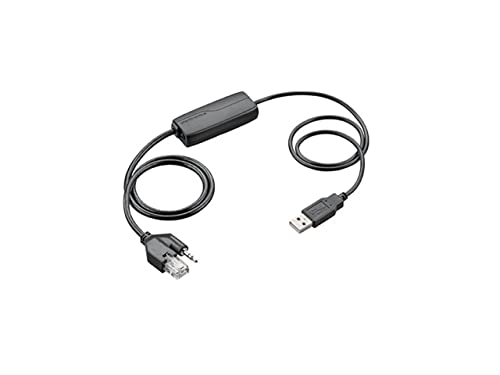
Our USB cable delivers reliable wired connectivity for Plantronics headsets with Quick Disconnect (QD) capability. Designed as a direct replacement or upgrade option, this cable turns your existing QD headset into a plug-and-play USB device for softphone applications, unified communications platforms, and computer-based calling.
The cable features a standard USB-A connector on one end and a Quick Disconnect interface on the other, ensuring compatibility across our professional headset lineup. Built with the same durability standards as our headsets, it provides stable audio transmission and inline call controls where supported by your headset model.
- USB-A connector for universal PC and Mac compatibility
- Quick Disconnect (QD) interface fits all Plantronics QD headsets
- Plug-and-play installation – no drivers required
- Inline volume and mute controls on compatible headset models
- Approximately 6.5 feet (2 meters) cable length for desk mobility
Cable Specifications & Build Quality
The Plantronics USB cable uses a high-grade copper core with PVC jacketing to ensure clear audio signal transmission and long-term flexibility. The cable measures approximately 6.5 feet (2 meters) from end to end, giving you enough reach to move freely at your desk without excess slack creating desktop clutter.
Both connection points feature reinforced strain relief molding to prevent the most common failure point in headset cables – fraying at the connector. The USB-A plug is gold-plated for corrosion resistance and consistent contact, while the Quick Disconnect coupler uses the same locking mechanism found across our professional headset range. This cable is rated for thousands of connect/disconnect cycles, matching the duty cycle of headsets used in contact center and office environments.
Headset Compatibility
This USB cable works with any Plantronics headset equipped with a Quick Disconnect interface. The QD system is our universal connector standard, found on models including the EncorePro series, SupraPlus lineup, Savi wireless headsets (when used in wired mode), and Blackwire models with detachable cables.
Identifying Quick Disconnect Headsets
If your Plantronics headset has a small cylindrical connector at the base of the headband or earpiece cable (rather than a hardwired cable), it uses Quick Disconnect. This modular design lets you swap between connection types – USB for computer use, the base adapter cable for desk phone systems, or wireless adapters for mobile setups. The cable does not work with headsets that have a permanently attached USB connector or proprietary wireless bases.
Setup & Driver Installation
Installation is completely plug-and-play on Windows, macOS, and Chrome OS systems. Simply connect the USB-A plug to an available USB port on your computer, attach your Quick Disconnect headset to the cable’s QD interface, and your operating system will recognize it as a standard USB audio device within seconds.
No software installation is required for basic headset functionality – audio input/output and inline controls work immediately. For advanced features like firmware updates, equalizer settings, or integration with specific unified communications platforms, you can optionally install Plantronics Hub software from our support site. The cable draws power directly from the USB bus, so there’s no external power adapter needed.
Complete Your Headset Setup



What people are saying

Common Questions About Plantronics USB Cables
No, this USB cable is designed for computer connectivity only. It terminates in a USB-A plug, which connects to PCs, Macs, and other USB-equipped devices. For desk phone use, you need a different cable designed for your specific phone model – typically an amplifier cable or direct-connect cord with an RJ9/RJ11 connector. Check your phone manufacturer’s compatibility before selecting a cable.
Look at the point where the headset cable meets the headband or earpiece. Quick Disconnect headsets have a small cylindrical connector (about the diameter of a pencil) that clicks into place with a twist-lock mechanism. If your headset cable is permanently attached or ends in a different connector type like USB or 3.5mm, it does not use Quick Disconnect and this cable will not fit.
The cable itself is a passive audio/data conduit, so control functionality depends on your headset model. Most Plantronics professional headsets with Quick Disconnect have inline controls built into the headset itself – the cable simply passes those signals through to your computer. If your headset has physical mute or volume buttons, they will work when connected via this USB cable on supported applications.
No, this is a data/audio cable, not a charging cable. Wireless Plantronics headsets typically charge through their base station or via a dedicated charging cable with the appropriate connector. This USB cable provides wired audio connectivity when you want to use a wireless headset in wired mode, but it does not deliver charging power.
There is no functional difference – this is the same cable included with many Plantronics USB headset packages. We offer it separately as a replacement option for lost or damaged cables, or for customers who want a spare cable to enable headset sharing. The specifications, build quality, and compatibility are identical to the original accessory.
This cable has a USB-A connector, which is the traditional rectangular USB plug. For USB-C ports (the smaller oval-shaped connector found on newer MacBooks and many Windows laptops), you will need a USB-A to USB-C adapter. Alternatively, check if we offer a USB-C version of this cable for your headset model – adapters work fine but a native USB-C cable provides a cleaner setup.
The standard Plantronics USB cable measures approximately 6.5 feet (2 meters) from end to end. This length accommodates most desk setups while minimizing excess cable clutter. Currently we do not offer an extended-length version of this specific cable, but you can use a standard USB extension cable if you need additional reach – just ensure the extension cable supports USB data transfer, not just power.