

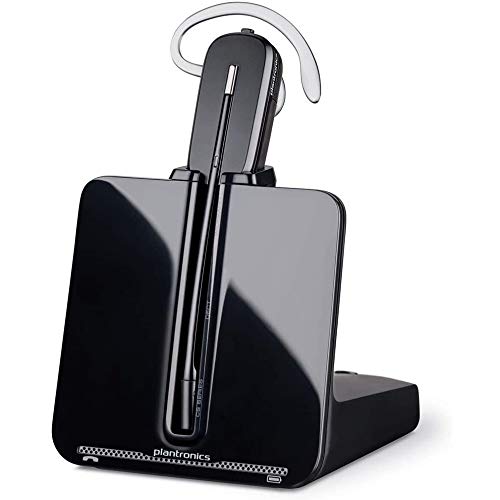


Plantronics EHS Cable – Electronic Hook Switch for Seamless Call Control
Our electronic hook switch cable eliminates the need for a mechanical handset lifter by connecting directly to your compatible desk phone. The Plantronics EHS cable enables remote call answer and end functionality, letting you control calls from up to 350 feet away with your wireless headset.
This intelligent cable creates a direct electronic interface between your Plantronics wireless headset base and your IP desk phone, so you can answer, end, and mute calls without touching the handset. We designed it for professionals who need full mobility without sacrificing call control — whether you’re moving between workstations, accessing files, or collaborating with colleagues while on a call.
- Electronic hook switch interface for hands-free call answer/end
- Compatible with major IP desk phone brands including Cisco, Avaya, Polycom, and Yealink
- Extends wireless range up to 350 feet from desk phone base
- Plug-and-play setup — no software installation required
- Eliminates mechanical handset lifter for cleaner desk setup
How the EHS Cable Works with Your Phone System
The electronic hook switch establishes a digital communication link between your Plantronics wireless headset base and your desk phone’s serial port. When an incoming call arrives, you simply press the call control button on your headset — the EHS cable sends the answer command directly to the phone, creating the connection without any physical handset movement.
This direct integration means your desk phone and headset stay synchronized throughout the call. When you end the call from your headset, the phone terminates the line simultaneously. Mute status mirrors across both devices, so colleagues at your desk can see the mute indicator on the phone display even when you activate it from your headset controls.
Installation and Setup Process
Connect the small modular plug into the AUX or EHS port on your Plantronics headset base — this port is typically located on the back panel near the power input. Route the cable to your desk phone and insert the other connector into the phone’s accessory port, sometimes labeled as AUX, EHS, or headset.
Most phone systems recognize the EHS connection automatically within seconds. You’ll know setup succeeded when your headset base unit’s power light remains solid and you can answer a test call using only the headset button. If your phone requires manual configuration, access the phone’s settings menu and enable the electronic hook switch or headset mode option under accessories.
Advantages Over Mechanical Handset Lifters
Cleaner Workspace
Electronic hook switch cables eliminate the mechanical lifter arm that physically raises your handset. This removes a moving part from your desk, reducing visual clutter and freeing up space around your phone. There’s no motorized component to worry about positioning or adjusting when you rearrange your workspace.
Faster Call Response
Mechanical lifters introduce a brief delay while the arm physically moves the handset off the cradle. EHS cables execute the answer command electronically in milliseconds, so calls connect the instant you press your headset button. For high-volume call environments, these fractions of a second accumulate into noticeable time savings across your day.
Compatible accessories for your Plantronics headset


What people are saying
Common questions about Plantronics EHS cables
Compatibility depends on your desk phone manufacturer and model series. We produce different EHS cable variants for each major phone platform — Cisco phones typically use the APC-43 cable, Polycom systems use APV-63, and Avaya models require the APP-51 variant. Check the compatibility list on the product page for your phone’s exact model number, as connector types vary even within the same manufacturer. Most modern IP desk phones from the past decade support EHS functionality, though some models may need a firmware update to enable the feature.
No, these are mutually exclusive solutions — you use one or the other, not both simultaneously. The EHS cable replaces the handset lifter entirely by providing electronic call control. If your desk phone has an EHS or AUX port, the electronic hook switch cable is the cleaner and more reliable option. Handset lifters are designed for phones that lack EHS capability and must rely on physically lifting the handset to complete the call circuit.
The cable draws its minimal power through the connections to your headset base and desk phone — no separate power supply, batteries, or USB connection needed. Once you plug both ends in, the electronic hook switch interface operates continuously as long as your headset base and phone have power. This passive design means there’s nothing to recharge or replace over the cable’s lifespan.
The EHS cable doesn’t limit your headset’s wireless range — you’ll still get the full rated distance for your specific headset model, typically up to 350 feet for DECT systems like the CS500 series. The cable only handles the call control signaling between your phone and headset base. Your roaming range is determined by the DECT wireless link between the base and your headset, which remains unchanged whether you use EHS or a handset lifter.
You actually gain functionality compared to mechanical lifters. EHS cables provide full two-way communication for answer, end, and mute commands with status synchronization between your phone and headset. Many users find call control more responsive since there’s no mechanical delay. The only feature you lose is the ability to see the handset physically off-hook as a visual indicator, but your phone’s display will still show active call status.
First verify both connectors are fully seated in the headset base AUX port and the phone’s EHS port — a partially inserted plug is the most common issue. Check your phone’s settings menu for an EHS or electronic hook switch option that may need manual activation. Some phones label this feature as headset mode or remote answer. Power cycle both your headset base and desk phone to reset the connection. If problems persist, confirm you have the correct cable variant for your phone model, as different manufacturers use incompatible connector pinouts.
Call transfer capability depends on your desk phone system’s features, not the EHS cable itself. The cable passes button commands from your headset to the phone, so if your phone supports blind or attended transfers through its interface, you’ll typically access those functions through the phone’s keypad while wearing your headset. Some advanced phone systems allow transfer through headset multi-button controls when properly configured in the phone’s settings. The EHS cable maintains the connection throughout the transfer process.